Reach & Engage Reach & Engage Orchestrator
Multichannel campaigns that decide the next step
The Reach & Engage orchestrator builds a campaign’s full sequence: WhatsApp, SMS, email and calls, with rules for what happens when a customer doesn’t reply, replies or a send fails, and audiences that come straight from your CRM.
Talk to an expert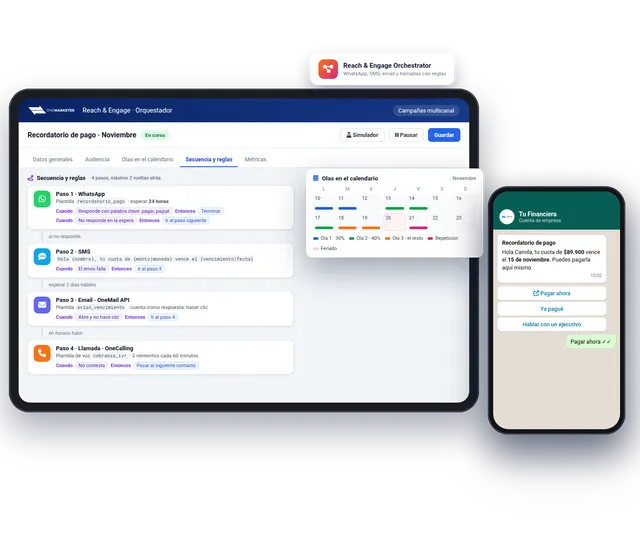
We have advised major brands in 16 countries



































Why orchestrate your campaigns
-
One flow, four channels
WhatsApp, SMS, email with OneMail API and calls with OneCalling in the same campaign.
-
When / if / then rules
No reply in 24 hours, send an SMS; email opened without a click, call; reply received, stop.
-
CRM segmentation
Filter customers by any Centric field and size the audience before scheduling.
-
Lower cost per contact
Use the cheapest channel first and escalate only to those who didn’t reply.
How it works
- 1
Define the audience
Upload a list or build a CRM segment with filters; see how many contacts have a phone or email.
- 2
Build the sequence
Add steps per channel with their template, wait time and rules.
- 3
Schedule it in waves
Split the audience by percentage or count on the calendar, respecting hours and holidays.
- 4
Simulate and measure
Test the campaign with one audience row and follow the per-step funnel live.
Features
-
Sequence and rules
Events such as no reply, reply, keyword, read without reply, no answer or busy.
-
CRM segments
Filters on Centric fields with operators such as equals, contains, has a value or greater than.
-
Waves on the calendar
Launch by percentage or count, repeat every N days, with general hours and holidays.
-
Several contacts per row
If the account holder doesn’t answer, the campaign moves to the next contact with data.
-
Simulator
Shows step by step what a customer would receive for the events you simulate.
-
Per-step metrics
Sent, delivered, read, replies, failed and opt-outs per channel and step.
-
Validation before scheduling
Flags a missing template, an unmapped variable or a rule pointing to a step that doesn’t exist.
-
CRM update
Each contact’s outcome can go back to the CRM for the next campaign.
Use cases
-
Collections
WhatsApp on notice day, SMS if there’s no reply and a call before the due date.
-
Renewals
A segment of expiring contracts with staggered reminders across channels.
-
Retail
Repurchase campaigns for frequent customers, in waves so the sales team isn’t overloaded.
-
Healthcare and services
Appointment confirmation over WhatsApp and an automatic call to those who don’t confirm.
Frequently asked questions
How is it different from a Reach & Engage campaign?
A campaign sends one message over one channel. The orchestrator chains several steps and channels and picks the next one based on what each customer does.
Do I need to export lists from the CRM?
No. The audience can be a Centric segment with filters; you can also upload an Excel or CSV list.
Does it respect hours and holidays?
Yes. Each step goes out within the channel window or general hours, and calendar holidays are skipped.
Can I test it before launch?
Yes. The simulator shows what an audience customer would receive for the events you choose.
Orchestrate your next campaign
We’ll show you a real sequence with your channels, your CRM and your rules.
Request your demo